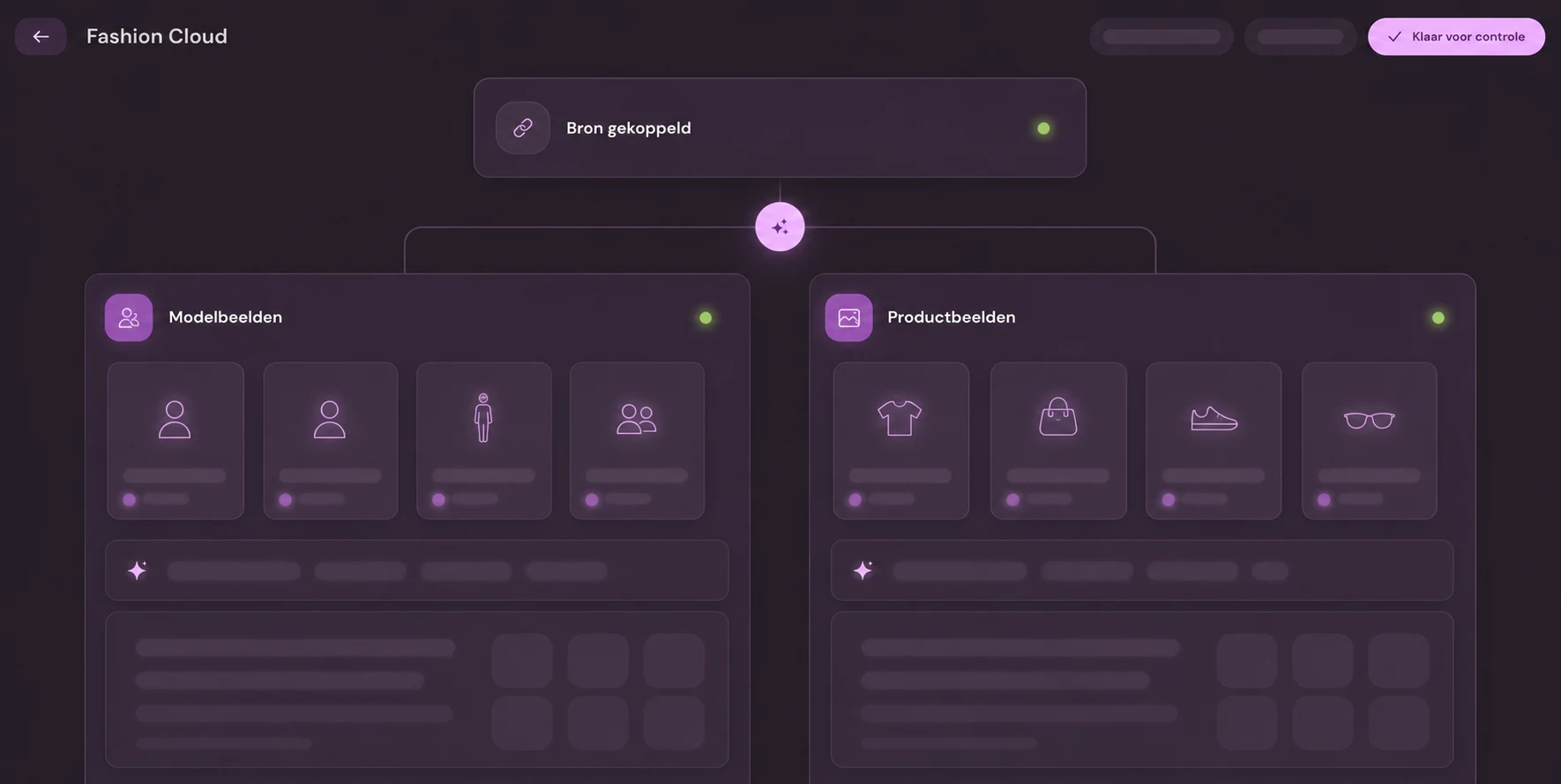
For many multibrand retailers, Fashion Cloud is where brands share their packshots, materials, and care instructions. Photopilot retrieves that material every half hour, matches it by EAN to your own items, and turns it into online-store-ready images and product text. This turns a brand database into a consistent, automated source for your product pages.
01
What Photopilot retrieves from Fashion Cloud
With the API token for your retailer account, Photopilot reads which brands you grant access to, which products those brands have published, and which images belong to them. Along with the images, the item information is imported too: composition, material percentages, and care instructions as Ginetex codes. Photopilot only sees brands for which you have rights in Fashion Cloud. Nothing is changed in Fashion Cloud itself.
02
Match by EAN and color
The EAN is the key: every variant in your item file with a barcode can find a Fashion Cloud product. That product's color then determines which color variant the images belong to, so a navy shirt does not get images of the sand-colored version. If a barcode later moves to another product at the brand, Photopilot follows that move. This keeps images attached to the right item through season changes and relabeling.
03
From brand packshot to image in your house style
Brands supply images with their own margins, backgrounds, and aspect ratios. Photopilot standardizes them according to your store rules: crop, background color, whitespace, image order, and file name by item group. No model photo or lifestyle image? Create one with AI model photos, or let Iris, the AI creative director, build campaign images from the packshot. Each result can go to review first, or run automatically by brand.
04
Material and care instructions as a source for product copy
The composition and Ginetex care codes from Fashion Cloud are converted into readable material information and care symbols. Photopilot uses that data for product copy, SEO copy, filter values, and alt text in your own tone of voice. This means no one has to manually retype a label or look it up in a brand portal. If better material data comes in later, the text can be rebuilt.
05
What your team sees every day
In the overview, you can see per brand how many products are already covered by Fashion Cloud and which in-stock products still have no usable image. That list immediately becomes the shotlist for the studio or the work queue for AI editing. With autopilot, products with good brand images go straight to the webshop without manual intervention, while uncertain cases stay in review. The reporting also shows how much photography work Fashion Cloud saves you each season.
06
Set up and roll out
You provide the API token from the Fashion Cloud retailer account and an item file or item source with EANs. Photopilot then starts the first import, which runs in batches for large catalogs and resumes where it left off after an interruption. Within a few days, the first brands are linked and processed, without your IT team needing to turn it into a project. The brands themselves control which brands participate through their permissions in Fashion Cloud.
Fashion Cloud at a glance
What is exchanged
Photopilot imports the brand permissions, products with their images, and item information from Fashion Cloud, such as material and care instructions. Images are linked to the correct item and color by EAN. If a barcode later moves to another product, Photopilot follows that move.
How often
Brand rights, products, and images are updated every half hour. A large initial import runs in batches and resumes where it left off after an interruption.
What you provide
A Fashion Cloud retailer account with an API token. Brands grant permission in Fashion Cloud themselves. Photopilot only sees the brands you have rights for.
Good to know
Fashion Cloud remains a source: Photopilot does not send anything back to it. If a product has no usable Fashion Cloud image, you will see that in the report, so the studio can shoot it intentionally.
Let source data flow through to sales-ready product pages
300.000+articles processed
9,5M+supplier images indexed
~3.200photos automatically edited per day
FAQ
Frequently Asked Questions
Can Photopilot automatically add Fashion Cloud images to my online store?
Yes. After processing, images are sent directly to Shopify, WooCommerce, BigCommerce, or Shopware, or to other platforms via FTP/SFTP, the Webshop Excel, or the API. For each brand, you choose whether this happens fully automatically or only after approval.
How do I connect Fashion Cloud to Photopilot?
You create an API token in your Fashion Cloud retailer account and give it to Photopilot. Photopilot then automatically reads which brands give you access and starts the import. Nothing needs to be installed.
Do Fashion Cloud images end up with the correct color variant?
Yes. Photopilot looks up the product using the EAN of your variant and uses the color from the Fashion Cloud product to attach the images to the right color. Sizes in the same color therefore share the same image set.
Does Photopilot use the care instructions from Fashion Cloud for product texts?
Yes. Ginetex care codes and material composition are converted into care symbols and readable care information. These are used in product text, filters, and specifications on the product page.
Can I have Fashion Cloud packshots converted into model photos?
Yes. Photopilot creates AI model photos from a packshot, using a model that fits your brand. An AI photo costs between €0.05 and €0.21 per photo in the queue and is often ready within an hour; for the highest quality, there is Precision+ mode.
What if a brand does not have its images in Fashion Cloud?
The item is then listed in the missing images overview, sorted by stock level. You can then prioritize photography, use images from another source such as Stockbase, or fill in an image with AI.
Can I set whether Fashion Cloud images go live immediately for each brand?
Yes. Brands with consistent packshots can run on autopilot, while brands with varying quality can be sent to review first. You can adjust this later by brand or product group.
Does Photopilot automatically detect new brands in Fashion Cloud?
Yes. Brand permissions are refreshed every half hour. As soon as a brand grants you access, that brand’s products and images are imported in the next run.
Does Photopilot overwrite my own studio photos with Fashion Cloud images?
No. For each image slot, one version wins based on the rules you agree on, for example studio over brand image. The other images remain visible as alternatives, so you can always switch.
How often does Photopilot fetch new images from Fashion Cloud?
Every half hour. Brand permissions are updated just as often: if a brand gives you access, the images come in during the next run.
Which key does Photopilot use to match Fashion Cloud to our items?
By EAN. Any variant with an EAN in your item file can find a Fashion Cloud product, and that product's color determines which item the images belong to.
What does Photopilot need for the Fashion Cloud integration?
An API token from your Fashion Cloud retailer account. The brands control which brands participate through their permissions in Fashion Cloud.
What happens when a supplier has no image on Fashion Cloud?
Photopilot flags missing imagery per item, so you can fill the gaps through your studio, AI editing or another source.
Can I review Fashion Cloud images before publishing?
Yes, every image goes through the same review and image rules as studio and AI images before it is sent to your webshop.
















%20--%3e%3csvg%20version='1.1'%20id='Layer_1'%20xmlns='http://www.w3.org/2000/svg'%20xmlns:xlink='http://www.w3.org/1999/xlink'%20x='0px'%20y='0px'%20viewBox='0%200%20945%20125'%20style='enable-background:new%200%200%20945%20125;'%20xml:space='preserve'%3e%3cpath%20d='M8.73,62.42c0-31.54,24.83-56.21,56.53-56.21c21.08,0,37.79,9.99,47.47,25.3l-14.05,8.59%20c-6.56-10.77-18.58-17.96-33.42-17.96c-22.17,0-39.19,17.65-39.19,40.29s17.02,40.29,39.19,40.29c14.83,0,26.86-7.34,33.42-17.96%20l14.05,8.43c-9.52,15.46-26.86,25.45-47.47,25.45C33.56,118.64,8.73,93.96,8.73,62.42z'/%3e%3cpath%20d='M127.55,95.68c0-12.49,9.99-20.46,23.74-20.46h16.24c4.53,0,7.34-2.65,7.34-6.56c0-4.68-5.15-10.78-15.93-10.78%20c-9.53,0-15.15,5.15-17.96,11.87l-11.09-7.18c4.53-10.15,14.21-18.11,29.05-18.11c19.99,0,30.92,13.43,30.92,27.8v44.82h-13.74%20v-7.81c-2.65,4.06-10.15,9.53-21.24,9.53C138.17,118.79,127.55,108.49,127.55,95.68z%20M175.18,87.72v-0.94h-22.17%20c-5.93,0-9.99,3.9-9.99,9.06c0,5.62,4.68,10.15,13.12,10.15C168,105.99,175.18,98.34,175.18,87.72z'/%3e%3cpath%20d='M235.29,118.17c-15.62,0-24.52-8.59-24.52-25.61V7.77h14.83V92.4c0,7.5,4.22,11.56,12.02,11.56v14.21H235.29z'/%3e%3cpath%20d='M251.22,19.79c0-5.62,4.53-9.99,10.15-9.99c5.93,0,10.31,4.37,10.31,9.99s-4.37,9.84-10.31,9.84%20C255.75,29.63,251.22,25.41,251.22,19.79z%20M254.03,117.08V46.18h14.83v70.89H254.03z'/%3e%3cpath%20d='M286.35,81.63c0-21.08,16.55-37.16,38.1-37.16c14.37,0,26.23,7.03,32.64,18.11l-12.65,8.12%20c-3.59-7.03-11.24-11.87-19.99-12.02c-12.96,0.16-22.49,9.84-22.49,22.95c0,12.96,9.53,22.8,22.49,22.8%20c8.59,0,15.93-4.53,19.83-11.4l12.49,8.12c-6.4,10.77-18.27,17.65-32.32,17.65C302.9,118.79,286.35,102.71,286.35,81.63z'/%3e%3cpath%20d='M369.73,81.63c0-21.08,16.55-37.16,38.1-37.16c21.71,0,38.1,16.08,38.1,37.16c0,21.08-16.4,37.16-38.1,37.16%20C386.28,118.79,369.73,102.71,369.73,81.63z%20M430.31,81.63c0-13.12-9.68-22.8-22.49-22.95c-12.96,0.16-22.49,9.84-22.49,22.95%20s9.53,22.8,22.49,22.8C420.63,104.43,430.31,94.75,430.31,81.63z'/%3e%3cpath%20d='M500.73,62.42c0-31.54,24.83-56.21,56.53-56.21c21.08,0,37.79,9.99,47.47,25.3l-14.05,8.59%20c-6.56-10.77-18.58-17.96-33.42-17.96c-22.17,0-39.19,17.65-39.19,40.29s17.02,40.29,39.19,40.29c14.83,0,26.86-7.34,33.42-17.96%20l14.05,8.43c-9.52,15.46-26.86,25.45-47.47,25.45C525.56,118.64,500.73,93.96,500.73,62.42z'/%3e%3cpath%20d='M646.88,118.17c-15.61,0-24.52-8.59-24.52-25.61V7.77h14.83V92.4c0,7.5,4.22,11.56,12.02,11.56v14.21H646.88z'/%3e%3cpath%20d='M664.05,86.31V46.18h14.83v40.44c0,10.93,6.25,17.96,16.55,17.96c10.15,0,16.55-7.03,16.55-17.96V46.18h14.83v40.13%20c0,17.8-10.31,32.48-31.39,32.48C674.2,118.79,664.05,104.11,664.05,86.31z'/%3e%3cpath%20d='M822.39,81.63c0,20.92-16.55,37.16-37.48,37.16c-8.43,0-16.71-2.97-23.11-8.28v6.56h-14.83V7.77h14.83v44.97%20c6.4-5.31,14.68-8.28,23.11-8.28C805.83,44.46,822.39,60.86,822.39,81.63z%20M806.77,81.63c0-13.12-9.52-22.8-22.49-22.95%20c-12.8,0.16-22.49,9.84-22.49,22.95s9.68,22.8,22.49,22.8C797.24,104.43,806.77,94.75,806.77,81.63z'/%3e%3cpath%20d='M890.2,117.08L922.37,7.77h13.9L904.1,117.08H890.2z'/%3e%3c/svg%3e)
'/%3e%3cpath%20d='M150.336,366.953h15.189v2.531H153.788v3.309h6.846v2.531h-6.846V379h11.88V381.8H150.336V366.953Z'%20transform='translate(-127.628%20-366.953)'/%3e%3cpath%20d='M223.733,366.953h2.36l10.44,8.745a12.625,12.625,0,0,1,1.7,1.611c-.087-1.237-.144-2.1-.144-2.561v-7.795h3.107V381.8h-2.359l-10.9-9.177a12.259,12.259,0,0,1-1.238-1.208c.116,1.15.144,1.927.144,2.358V381.8h-3.107V366.953Z'%20transform='translate(-181.029%20-366.953)'/%3e%3cpath%20d='M312.449,381.8H309V369.6h-6.821v-2.646h17.118V369.6h-6.845v12.2Z'%20transform='translate(-238.101%20-366.953)'/%3e%3cpath%20d='M379.458,366.953h3.453V381.8h-3.453V366.953Z'%20transform='translate(-294.329%20-366.953)'/%3e%3cpath%20d='M409.442,366.953H412.9V379h11.131V381.8H409.442V366.953Z'%20transform='translate(-316.145%20-366.953)'/%3e%3cpath%20d='M480.11,379.005h9.838V366.953H493.4v11.333c0,2.79-.891,3.51-3.681,3.51H480.34c-2.79,0-3.681-.719-3.681-3.51V366.953h3.451v12.052Z'%20transform='translate(-365.05%20-366.953)'/%3e%3cpath%20d='M560.662,379.005V369.6h11.391v9.406Zm-3.452-8.543v7.824c0,2.79.891,3.51,3.682,3.51h10.932c2.79,0,3.681-.719,3.681-3.51v-7.824c0-2.791-.891-3.509-3.681-3.509H560.892c-2.791,0-3.682.718-3.682,3.509Z'%20transform='translate(-423.656%20-366.953)'/%3e%3cpath%20d='M642.423,366.953h2.79l6.99,8.974,6.846-8.974h2.762V381.8h-3.193v-9.177a15.583,15.583,0,0,1,.116-1.582,10.16,10.16,0,0,1-.863,1.554l-5.581,7.421h-.69l-5.58-7.45a6.632,6.632,0,0,1-.893-1.525c.059.6.087,1.093.087,1.582V381.8h-2.79V366.953Z'%20transform='translate(-485.654%20-366.953)'/%3e%3cpath%20d='M735.446,379.005V369.6h11.39v9.406Zm-3.453-8.543v7.824c0,2.79.892,3.51,3.682,3.51h10.932c2.79,0,3.681-.719,3.681-3.51v-7.824c0-2.791-.891-3.509-3.681-3.509H735.675c-2.79,0-3.682.718-3.682,3.509Z'%20transform='translate(-550.823%20-366.953)'/%3e%3c/g%3e%3c/svg%3e)

'/%3e%3cpath%20d='M527.731,277.117v4.942h-13.3v16.728h-6.849V282.059c-7.609-.074,0,0-13.3-.127v-4.816Z'%20transform='translate(-369.199%20-277.117)'/%3e%3cpath%20d='M449.4,277.117v21.671h-4.684c-7.783-5.1-15.978-9.8-23.572-15.081.248,13.016.011.444.248,15.081H415.31V277.117h4.816c7.672,5.127,15.862,9.737,23.445,14.954-.169-11.981,0-4.568-.248-14.954Z'%20transform='translate(-331.928%20-277.117)'/%3e%3cpath%20d='M371.308,294.732v4.055H341.4V277.117h29.655v3.675H348.117v4.689c7.725.074,8.3.069,13.312.132,0,.375-.011,3.564-.011,3.8h-13.3v5.2C356.766,294.753,363.615,294.648,371.308,294.732Z'%20transform='translate(-297.045%20-277.117)'/%3e%3cpath%20d='M291.865,286.241c.032,7.181.354,9.077-.76,10.772-.861,1.3-1.938,1.626-4.182,1.774H262.216c-2.545-.29-4.473-1.188-4.816-3.675v-14.32c.338-2.487,2.265-3.4,4.816-3.675h24.2c2.783.517,5.36,1.23,5.449,4.435H264.117v12.419c6.87.148,14.062.042,20.989.127l.048-4.182h-10.9c-.032-1.964,0-2.17,0-3.8C281.478,286.109,285.291,286.067,291.865,286.241Z'%20transform='translate(-257.4%20-277.117)'/%3e%3c/g%3e%3c/svg%3e)