BigCommerce gives you a solid catalog with products, variants, and a fixed image order, but those images and texts still need to be added. Photopilot reads your catalog through the BigCommerce API, prepares images and product copy, and puts them back in their fixed positions after approval. Existing URLs and custom fields are left untouched.
01
What Photopilot reads from BigCommerce
Photopilot retrieves products and variants with their SKU, UPC, GTIN, and MPN, plus the existing product images in their sort order. Using those codes, Photopilot matches each BigCommerce product to the right item, even if your supplier data comes in by EAN and your store uses its own SKUs. An EAN in a custom field is recognized too. This creates one item view where supplier material and store data come together.
02
What happens in Photopilot
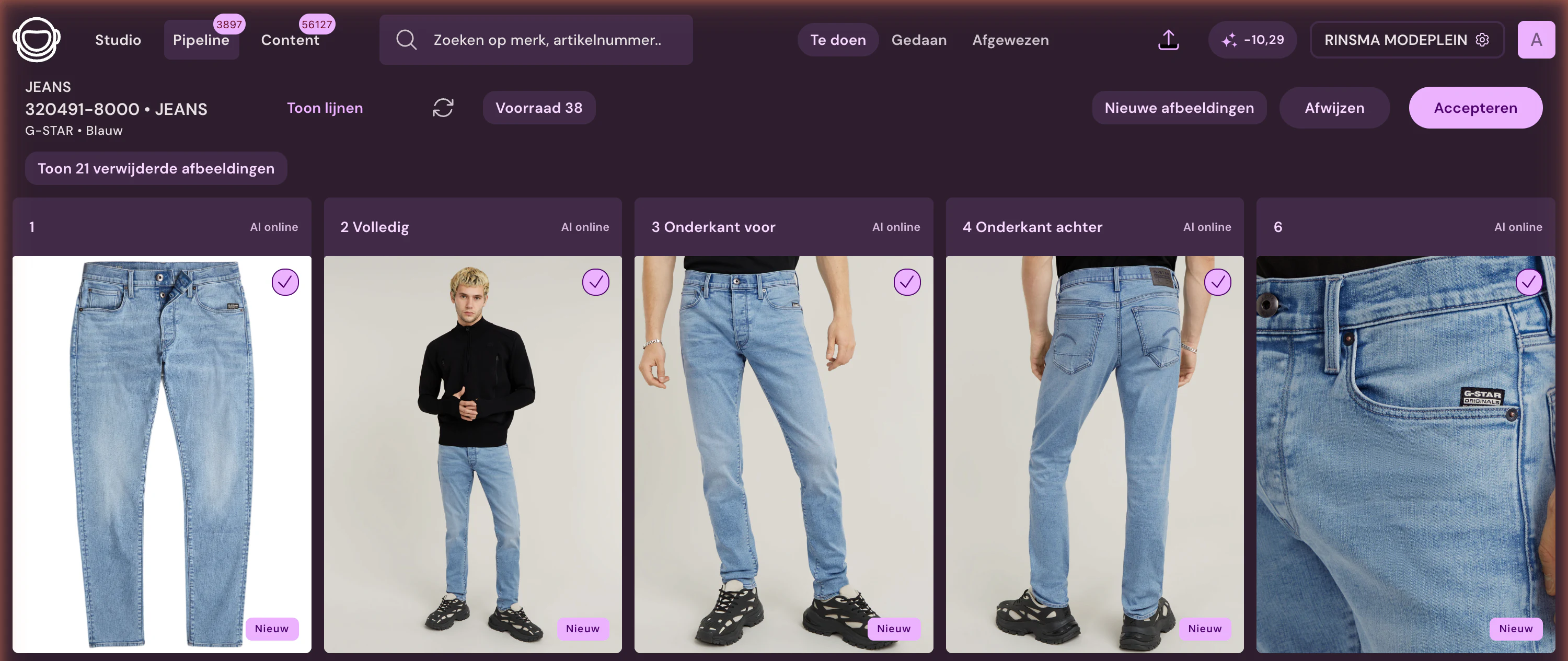
Supplier packshots and your own photos are cut out, placed on your store's background color, and cropped to the same aspect ratio, so category pages look consistent. No model photo? You can create one with an AI model; Iris, the AI creative director, builds campaign images from your existing material. Photopilot reads materials and care symbols from the label and writes the product name, description, page title, and meta description. Your team approves everything before it goes to BigCommerce.
03
Back in BigCommerce: image order and SEO fields
Each approved image gets a fixed position in the product’s image order; image 1 automatically becomes the thumbnail. Photopilot places the new image first and only then removes the old one, so a product is never left without a photo, and gives each image a descriptive description for search engines and screen readers. Texts go to the name, description, page title, and meta description. Photopilot deliberately leaves the product URL and your own fields unchanged, so existing links and integrations keep working.
04
Daily insight into your BigCommerce catalog
Photopilot shows which products still have no image, no thumbnail, or no description, and which are waiting for approval. An approved image usually appears in your store within a few minutes via the export queue. If the BigCommerce API limit is briefly reached, Photopilot waits for the specified time and then continues, without creating duplicate images. With autopilot, new products move through the fixed steps automatically.
05
Set up in an afternoon
In BigCommerce, under Settings, you create an API account with write access to products and give Photopilot the store hash and access token. Photopilot then imports your catalog, and together we define which image positions and text fields Photopilot fills. You do not need to prepare product fields or install anything. After a test round with a few products, the regular schedule is enabled.
06
Your own image order stays yours
In BigCommerce, teams often rearrange images themselves, for example for a campaign or the start of a season. Photopilot remembers which image it placed in which position and, when a new version is available, preferably replaces that exact image rather than an image you placed there yourself. Stores with sorting that starts at 0 or at 1 are both handled correctly. This lets Photopilot and your team work side by side in the same product gallery.
BigCommerce at a glance
What is exchanged
Photopilot places an approved image in its fixed position on the product and replaces the image that was there. Image 1 becomes the thumbnail. Copy is written to the name, description, page title, and meta description. Photopilot deliberately leaves the URL and custom fields unchanged so existing links keep working.
How often
An approved image usually reaches BigCommerce through the export queue within a few minutes. The new image is added first, and only then is the old one removed, so a product is never left without an image.
What you provide
An API account in BigCommerce with the store hash and an access token with write access to products.
Good to know
If your team rearranges images in BigCommerce, Photopilot preferably replaces the image it previously placed in that position, so your own order is preserved.
Let sales-ready content land in your webshop automatically
300.000+articles processed
9,5M+supplier images indexed
~3.200photos automatically edited per day
FAQ
Frequently Asked Questions
Can Photopilot automatically add product photos to BigCommerce?
Yes. After approval, Photopilot puts the image in its fixed position for the product and replaces the image that was there. Image 1 becomes the thumbnail, and it is usually online within a few minutes.
How do I connect BigCommerce to Photopilot?
Create an API account in BigCommerce with write permissions for products and give Photopilot the store hash and access token. Photopilot will then run a test read of your catalog.
Which codes does Photopilot use to match BigCommerce products?
By SKU, UPC, GTIN, and MPN, and by an EAN in a custom field. This means supplier images that come in by EAN still match products that have your own SKU in your store.
Does Photopilot change my product URLs in BigCommerce?
No. Photopilot fills in the name, description, page title, and meta description, but deliberately leaves the URL and your own fields unchanged. Existing links and integrations therefore keep working.
Is a BigCommerce product ever without a photo during an update?
No. Photopilot places the new image first and only removes the old one afterward. If an upload fails, the existing image simply remains in place.
Can I approve content before Photopilot sends it to BigCommerce?
Yes, everything goes through review first. Once you trust a step, you can put it on autopilot later.
Do I need to install anything in BigCommerce for Photopilot?
No. An API account with the right permissions is enough; no app or theme change is needed.
What if my supplier has no images for a BigCommerce product?
Then you can turn your own photo into a cutout packshot or have an AI model photo generated. AI photos cost €0.05 to €0.21 per photo at queue pricing and are often ready within an hour.
Does Photopilot respect the image order I set in BigCommerce?
Yes. Photopilot preferably replaces the image it previously placed in a position itself, not an image you placed there. So your own rearrangement stays in place.
What does Photopilot send to BigCommerce?
Approved images in their fixed positions, with image 1 as the thumbnail, plus the name, description, page title, and meta description.
How quickly does an approved image appear in BigCommerce?
Usually within a few minutes after approval. The new image is added first, then the old one is removed.
What does Photopilot need to connect BigCommerce?
An API account with the store hash and an access token with write access to products.
Do I have to prepare product fields myself?
No. We decide together which product fields, variants, and images lead, based on your actual shop setup rather than a standard list.
















%20--%3e%3csvg%20version='1.1'%20id='Layer_1'%20xmlns='http://www.w3.org/2000/svg'%20xmlns:xlink='http://www.w3.org/1999/xlink'%20x='0px'%20y='0px'%20viewBox='0%200%20945%20125'%20style='enable-background:new%200%200%20945%20125;'%20xml:space='preserve'%3e%3cpath%20d='M8.73,62.42c0-31.54,24.83-56.21,56.53-56.21c21.08,0,37.79,9.99,47.47,25.3l-14.05,8.59%20c-6.56-10.77-18.58-17.96-33.42-17.96c-22.17,0-39.19,17.65-39.19,40.29s17.02,40.29,39.19,40.29c14.83,0,26.86-7.34,33.42-17.96%20l14.05,8.43c-9.52,15.46-26.86,25.45-47.47,25.45C33.56,118.64,8.73,93.96,8.73,62.42z'/%3e%3cpath%20d='M127.55,95.68c0-12.49,9.99-20.46,23.74-20.46h16.24c4.53,0,7.34-2.65,7.34-6.56c0-4.68-5.15-10.78-15.93-10.78%20c-9.53,0-15.15,5.15-17.96,11.87l-11.09-7.18c4.53-10.15,14.21-18.11,29.05-18.11c19.99,0,30.92,13.43,30.92,27.8v44.82h-13.74%20v-7.81c-2.65,4.06-10.15,9.53-21.24,9.53C138.17,118.79,127.55,108.49,127.55,95.68z%20M175.18,87.72v-0.94h-22.17%20c-5.93,0-9.99,3.9-9.99,9.06c0,5.62,4.68,10.15,13.12,10.15C168,105.99,175.18,98.34,175.18,87.72z'/%3e%3cpath%20d='M235.29,118.17c-15.62,0-24.52-8.59-24.52-25.61V7.77h14.83V92.4c0,7.5,4.22,11.56,12.02,11.56v14.21H235.29z'/%3e%3cpath%20d='M251.22,19.79c0-5.62,4.53-9.99,10.15-9.99c5.93,0,10.31,4.37,10.31,9.99s-4.37,9.84-10.31,9.84%20C255.75,29.63,251.22,25.41,251.22,19.79z%20M254.03,117.08V46.18h14.83v70.89H254.03z'/%3e%3cpath%20d='M286.35,81.63c0-21.08,16.55-37.16,38.1-37.16c14.37,0,26.23,7.03,32.64,18.11l-12.65,8.12%20c-3.59-7.03-11.24-11.87-19.99-12.02c-12.96,0.16-22.49,9.84-22.49,22.95c0,12.96,9.53,22.8,22.49,22.8%20c8.59,0,15.93-4.53,19.83-11.4l12.49,8.12c-6.4,10.77-18.27,17.65-32.32,17.65C302.9,118.79,286.35,102.71,286.35,81.63z'/%3e%3cpath%20d='M369.73,81.63c0-21.08,16.55-37.16,38.1-37.16c21.71,0,38.1,16.08,38.1,37.16c0,21.08-16.4,37.16-38.1,37.16%20C386.28,118.79,369.73,102.71,369.73,81.63z%20M430.31,81.63c0-13.12-9.68-22.8-22.49-22.95c-12.96,0.16-22.49,9.84-22.49,22.95%20s9.53,22.8,22.49,22.8C420.63,104.43,430.31,94.75,430.31,81.63z'/%3e%3cpath%20d='M500.73,62.42c0-31.54,24.83-56.21,56.53-56.21c21.08,0,37.79,9.99,47.47,25.3l-14.05,8.59%20c-6.56-10.77-18.58-17.96-33.42-17.96c-22.17,0-39.19,17.65-39.19,40.29s17.02,40.29,39.19,40.29c14.83,0,26.86-7.34,33.42-17.96%20l14.05,8.43c-9.52,15.46-26.86,25.45-47.47,25.45C525.56,118.64,500.73,93.96,500.73,62.42z'/%3e%3cpath%20d='M646.88,118.17c-15.61,0-24.52-8.59-24.52-25.61V7.77h14.83V92.4c0,7.5,4.22,11.56,12.02,11.56v14.21H646.88z'/%3e%3cpath%20d='M664.05,86.31V46.18h14.83v40.44c0,10.93,6.25,17.96,16.55,17.96c10.15,0,16.55-7.03,16.55-17.96V46.18h14.83v40.13%20c0,17.8-10.31,32.48-31.39,32.48C674.2,118.79,664.05,104.11,664.05,86.31z'/%3e%3cpath%20d='M822.39,81.63c0,20.92-16.55,37.16-37.48,37.16c-8.43,0-16.71-2.97-23.11-8.28v6.56h-14.83V7.77h14.83v44.97%20c6.4-5.31,14.68-8.28,23.11-8.28C805.83,44.46,822.39,60.86,822.39,81.63z%20M806.77,81.63c0-13.12-9.52-22.8-22.49-22.95%20c-12.8,0.16-22.49,9.84-22.49,22.95s9.68,22.8,22.49,22.8C797.24,104.43,806.77,94.75,806.77,81.63z'/%3e%3cpath%20d='M890.2,117.08L922.37,7.77h13.9L904.1,117.08H890.2z'/%3e%3c/svg%3e)
'/%3e%3cpath%20d='M150.336,366.953h15.189v2.531H153.788v3.309h6.846v2.531h-6.846V379h11.88V381.8H150.336V366.953Z'%20transform='translate(-127.628%20-366.953)'/%3e%3cpath%20d='M223.733,366.953h2.36l10.44,8.745a12.625,12.625,0,0,1,1.7,1.611c-.087-1.237-.144-2.1-.144-2.561v-7.795h3.107V381.8h-2.359l-10.9-9.177a12.259,12.259,0,0,1-1.238-1.208c.116,1.15.144,1.927.144,2.358V381.8h-3.107V366.953Z'%20transform='translate(-181.029%20-366.953)'/%3e%3cpath%20d='M312.449,381.8H309V369.6h-6.821v-2.646h17.118V369.6h-6.845v12.2Z'%20transform='translate(-238.101%20-366.953)'/%3e%3cpath%20d='M379.458,366.953h3.453V381.8h-3.453V366.953Z'%20transform='translate(-294.329%20-366.953)'/%3e%3cpath%20d='M409.442,366.953H412.9V379h11.131V381.8H409.442V366.953Z'%20transform='translate(-316.145%20-366.953)'/%3e%3cpath%20d='M480.11,379.005h9.838V366.953H493.4v11.333c0,2.79-.891,3.51-3.681,3.51H480.34c-2.79,0-3.681-.719-3.681-3.51V366.953h3.451v12.052Z'%20transform='translate(-365.05%20-366.953)'/%3e%3cpath%20d='M560.662,379.005V369.6h11.391v9.406Zm-3.452-8.543v7.824c0,2.79.891,3.51,3.682,3.51h10.932c2.79,0,3.681-.719,3.681-3.51v-7.824c0-2.791-.891-3.509-3.681-3.509H560.892c-2.791,0-3.682.718-3.682,3.509Z'%20transform='translate(-423.656%20-366.953)'/%3e%3cpath%20d='M642.423,366.953h2.79l6.99,8.974,6.846-8.974h2.762V381.8h-3.193v-9.177a15.583,15.583,0,0,1,.116-1.582,10.16,10.16,0,0,1-.863,1.554l-5.581,7.421h-.69l-5.58-7.45a6.632,6.632,0,0,1-.893-1.525c.059.6.087,1.093.087,1.582V381.8h-2.79V366.953Z'%20transform='translate(-485.654%20-366.953)'/%3e%3cpath%20d='M735.446,379.005V369.6h11.39v9.406Zm-3.453-8.543v7.824c0,2.79.892,3.51,3.682,3.51h10.932c2.79,0,3.681-.719,3.681-3.51v-7.824c0-2.791-.891-3.509-3.681-3.509H735.675c-2.79,0-3.682.718-3.682,3.509Z'%20transform='translate(-550.823%20-366.953)'/%3e%3c/g%3e%3c/svg%3e)

'/%3e%3cpath%20d='M527.731,277.117v4.942h-13.3v16.728h-6.849V282.059c-7.609-.074,0,0-13.3-.127v-4.816Z'%20transform='translate(-369.199%20-277.117)'/%3e%3cpath%20d='M449.4,277.117v21.671h-4.684c-7.783-5.1-15.978-9.8-23.572-15.081.248,13.016.011.444.248,15.081H415.31V277.117h4.816c7.672,5.127,15.862,9.737,23.445,14.954-.169-11.981,0-4.568-.248-14.954Z'%20transform='translate(-331.928%20-277.117)'/%3e%3cpath%20d='M371.308,294.732v4.055H341.4V277.117h29.655v3.675H348.117v4.689c7.725.074,8.3.069,13.312.132,0,.375-.011,3.564-.011,3.8h-13.3v5.2C356.766,294.753,363.615,294.648,371.308,294.732Z'%20transform='translate(-297.045%20-277.117)'/%3e%3cpath%20d='M291.865,286.241c.032,7.181.354,9.077-.76,10.772-.861,1.3-1.938,1.626-4.182,1.774H262.216c-2.545-.29-4.473-1.188-4.816-3.675v-14.32c.338-2.487,2.265-3.4,4.816-3.675h24.2c2.783.517,5.36,1.23,5.449,4.435H264.117v12.419c6.87.148,14.062.042,20.989.127l.048-4.182h-10.9c-.032-1.964,0-2.17,0-3.8C281.478,286.109,285.291,286.067,291.865,286.241Z'%20transform='translate(-257.4%20-277.117)'/%3e%3c/g%3e%3c/svg%3e)