PhotopilotPhotopilot
Explanation

Do you need a PIM system for your webshop?

You need a PIM when you have to manage product data across multiple channels, languages, or marketplaces and your ERP and webshop can no longer keep up, often from a few thousand active items onward. If your main problem is images and copy per item, a content workflow solves that faster: images and content are matched, edited, and published per item, alongside your ERP or PIM rather than replacing it.

Updated:

Woman in a long cream-colored coat and brown trousers in the studio, model image for an item
  • 4 systems ERP, PLM, PIM, and DAM, each with its own role
  • 2 – 9 months indicative lead time for a PIM implementation
  • from €500 per month for the Photopilot content workflow

What do a PIM, DAM, PLM, and ERP do?

An ERP (Enterprise Resource Planning) system is your administrative core: purchasing, inventory, prices, orders, and accounting. In fashion retail, it also includes item numbers, EAN codes, sizes, and colors. The ERP knows what you have and what it costs, but it is rarely designed to manage rich product information.

A PIM (Product Information Management) system is where product information is enriched and prepared for channels: descriptions, attributes, translations, categories, and each marketplace’s requirements. A DAM (Digital Asset Management) system manages files such as photos, videos, and campaign material, including versions, rights, and metadata.

A PLM (Product Lifecycle Management) system sits at the start of the chain and is mainly used by brands that design and produce their own products: from sketch and tech pack to sample and production. A retailer that buys from brands usually does not need a PLM; the product data comes from the supplier.

Which system is the source of truth for what
SystemUsed as the basis forTypical userNot intended for
ERPItem numbers, EAN, inventory, prices, ordersPurchasing, finance, logisticsRich product descriptions, image management
PLMDesign, tech packs, samples, productionBrands with their own collectionWebshop content, inventory
PIMAttributes, copy, translations, channel requirementsE-commerce, marketplace teamEdit files, orders
DAMImage and video files, versions, rightsMarketing, studio, brandProduct attributes, prices
Content workflowImages and text by item: match, edit, review, publishE-commerce, studio, contentInventory, prices, accounting

How much does a PIM or DAM cost, and how long does implementation take?

Costs vary widely. Lightweight SaaS packages for smaller teams start at a few hundred euros per month, while a PIM for a retailer with many channels can easily cost tens of thousands of euros per year in license fees. Implementation comes on top of that: setting up the data model, building integrations with ERP and webshop, and cleaning up the existing data.

Do not underestimate the internal time required. Someone has to define the data model, set attributes per product group, and then make sure the data stays complete every day. A PIM organizes your information, but it does not fill it in by itself.

Typical market prices in the Netherlands, 2026, excluding VAT
SystemLicense or subscriptionImplementationLead time
PIM, lightweight SaaS€100 – €1,500 per month€0 – €15,0002 – 8 weeks
PIM, mid-market or enterprise€20,000 – €100,000+ per year€25,000 – €150,000+3 – 9 months
PIM, open source€0 for the basic version, support separate€15,000 – €100,000+3 – 9 months
DAM€300 – €5,000 per month€5,000 – €50,0001 – 4 months
Retail ERP€500 – €10,000+ per month€25,000 – €250,000+6 – 18 months

These are ranges by category, not quotes. Always ask for the total cost over three years, including integrations and your own team's time.

When does a fashion retailer really need a PIM?

A PIM pays off when you need to send the same product information to many places, each with its own rules. Think of a webshop in three languages, two or more marketplaces with required attributes, a B2B portal, and print catalogs. At that point, managing it all in the ERP or webshop itself becomes unsustainable.

Well-known examples of PIM systems include Akeneo, Pimcore, Plytix, inRiver, and Salsify. They differ in pricing model, whether they are open source or SaaS, and how much image management they handle themselves. The right choice depends on your channels, your team, and your existing systems, not on a feature checklist.

A few signs you need a PIM: your team is copying the same attributes into multiple systems, marketplaces reject items because attributes are missing, translations fall behind, and no one knows which version of a text is the right one.

  • More than one sales channel with its own attribute requirements, such as marketplaces
  • Multiple languages or countries with their own assortments
  • Several thousand active items or more, with many variants
  • A team that enriches product data every day and owns the process
  • An ERP or webshop that has no room for rich product information

When a PIM is not the first step

Many fashion stores buy a PIM even though the real bottleneck is somewhere else: supplier images are not linked to the right product, the studio is behind schedule, or product copy is missing or copied from the supplier. A PIM is a good cabinet, but if nothing goes into it, it stays empty.

With one online store, one or two languages, and a product range made up mostly of brands, your ERP or POS system is often enough as the source for product data, with your online store handling the presentation. The work is then about filling each product with strong images and copy, not managing hundreds of attributes.

A DAM is not always necessary either. If your images are mainly used per product in your online store, a product-focused image library is more useful than a folder structure with campaign material. A DAM is mainly worthwhile if marketing, brand, and partners share many individual files outside the product catalog.

Start by asking where items get stuck before they go online. If it is images and text, a content workflow will deliver faster gains; if it is channel-specific data, you need a PIM.

What a content workflow does that a PIM does not

A content workflow manages the work between source and publication. Images come in from suppliers, your own studio, or AI; are matched to the right item by item number, EAN, and color; edited to your template; and enriched with product copy. After a review where needed, everything is sent to the webshop, feed, or PIM.

A PIM usually expects that content to be ready already. It stores images and copy and distributes them across channels, but it does not take photos, remove backgrounds, create a model image from a packshot, or write copy based on the care label. Those steps happen before the PIM, often in separate tools and with a lot of manual work.

That means the two complement each other. The content workflow completes each product, while the PIM or webshop manages and distributes the result. It is important to define which system is the source of truth for each field, so text from the PIM is not overwritten by another source.

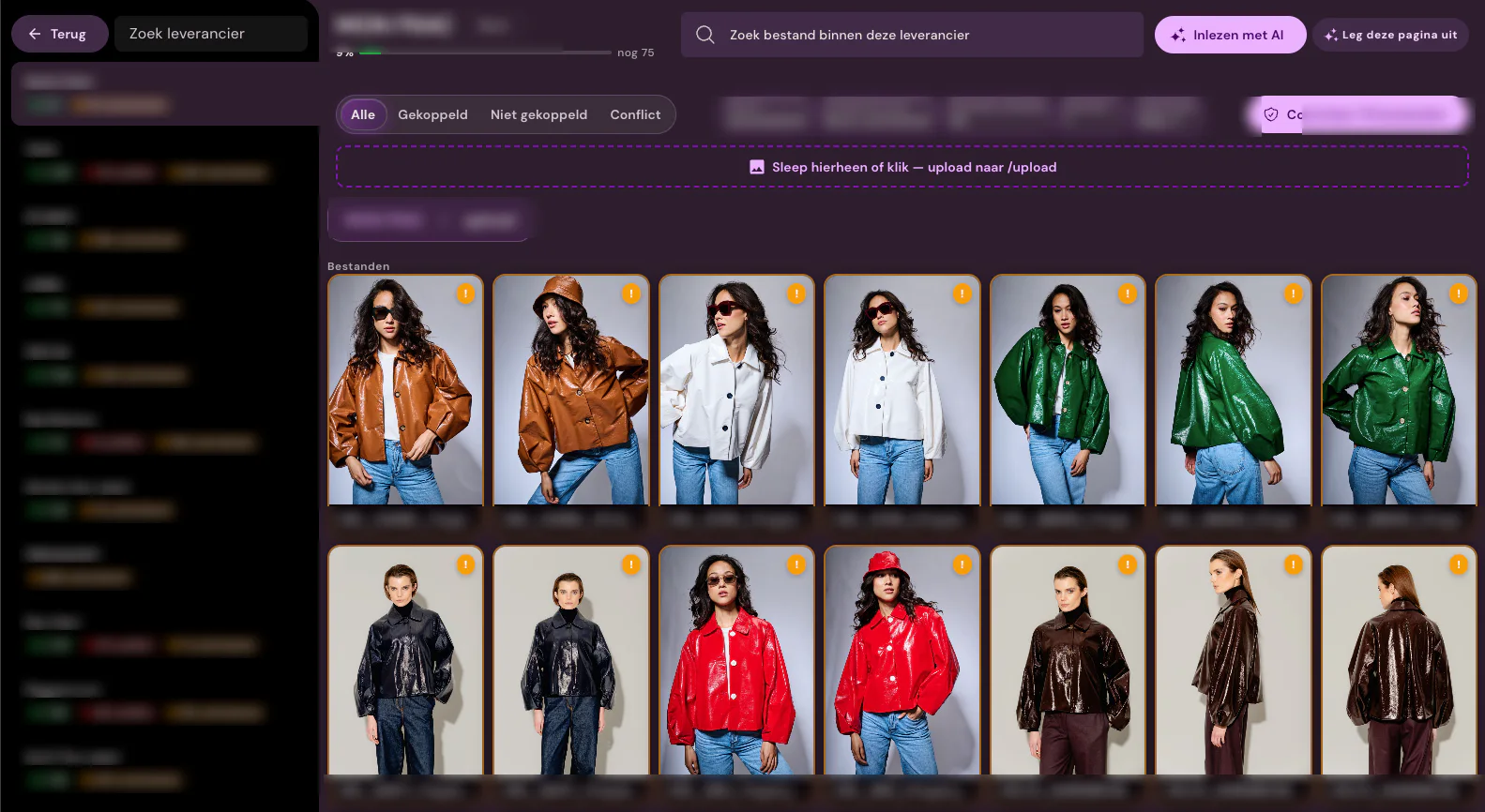
Supplier images of jackets in Photopilot, with filters for linked, unlinked, and conflict
Supplier images are linked per item; anything that does not match remains visible as a conflict.

How Photopilot works alongside your PIM or ERP

Photopilot is not a PIM, and it does not replace one. It reads item data from your ERP, POS system, online store, PIM, or product feed, and uses the item number, color, and EAN to keep images and content linked to the correct item. Images come in from Fashion Cloud, supplier portals, FTP, uploads, the studio, or AI generation.

For each item, you see all images and text together: supplier image, studio photo, AI model image, description, SEO title, and meta description. Standard edits such as background, crop, shadow, and color correction are included in the plan from €500 per month. You only pay per use for generative AI, such as AI images at €0.05 – €0.21 per photo and product content from €0.01 per fully enriched product.

Approved images and text go straight to your webshop, or to your PIM or DAM via FTP, SFTP, the Webshop Excel, a feed, or the API. If multiple systems run side by side, we explicitly define the source order so it is clear which system is authoritative.

Packshots of a coat, turtleneck, trousers, loafers, and a bag that together form one look
Images and content by item and by look, ready for your webshop or PIM.

Decision guide: what fits your situation?

Use the table below as a starting point. Most fashion retailers ultimately combine an ERP or POS system with an online store and a content workflow, and add a PIM once the number of channels or languages grows.

If you are unsure, start small. A content workflow is usually faster to set up and immediately gives you complete products, and the data it produces is a great way to populate a PIM later.

SituationLogical first step
One online store, one or two languages, many brands, images and copy are falling behindContent workflow alongside ERP and webshop
Own collection, design, and production in Excel and emailPLM, then a content workflow for the online store
Many channels and marketplaces with their own attribute requirementsPIM, supported by a content workflow for images and text
A lot of campaign material used by partners and storesDAM alongside the product images for each product
Inventory, prices, and item numbers are incorrectGet the ERP or POS system in order first
FAQ

Frequently Asked Questions

What is the difference between a PIM and a DAM?

A PIM manages product information such as attributes, copy, and translations, and distributes it across channels. A DAM manages files such as photos and videos, with versions and usage rights. Many organizations use both, or a PIM with limited image management.

What is the difference between a PIM and an ERP?

The ERP is authoritative for the business side: item numbers, EAN, inventory, prices, and orders. The PIM is authoritative for presentation: descriptions, attributes, categories, and translations per channel. In most cases, the PIM pulls the base data from the ERP.

How many products do you need before you need a PIM?

There is no fixed threshold, but it often starts to make sense once you have several thousand active items across multiple channels or languages. The number of channels and each channel’s requirements matter more than the number of items.

How much does a PIM system cost?

As an indication, prices range from €100 to €1,500 per month for lightweight SaaS packages to €20,000 – €100,000 or more per year for mid-market and enterprise solutions. Implementation comes on top of that and can range from almost nothing to well over €100,000, plus internal hours for the data model and management.

Is a PLM the same as a PIM?

No. A PLM supports design and production, from sketch and tech pack to sample. A PIM starts once the product is ready and makes sure the product information is complete and correct across all sales channels.

Which PIM systems are available for fashion?

Well-known examples include Akeneo, Pimcore, Plytix, inRiver, and Salsify. They differ in pricing model, whether they are open source or SaaS, and how much image management they offer. Choose based on your channels, languages, and existing integrations.

Does Photopilot replace a PIM?

No. Photopilot is a content workflow: matching, editing, checking, and publishing images and copy per product. If you have a PIM, Photopilot sends the approved images and copy to it via FTP, SFTP, Excel, feed, or API.

Can Photopilot read product data from my PIM?

Yes, for example via a CSV, JSON, or XML product feed from the PIM, or through the integration with your online store or ERP. Item number, color, and EAN then keep images and texts linked to the correct item.

Do I need a DAM to manage product photos?

Not necessarily. For product images used mainly in your online store, a product-focused image library is often more useful than a DAM with folders. A DAM is mainly worthwhile when you have a lot of campaign material to share with partners and stores.