

The five basic care symbol shapes
The wash label, known in English as the care label, uses the same symbols internationally (ISO 3758, managed in Europe by GINETEX). The order on the label is always the same: washing, bleaching, drying, ironing, and professional cleaning.
Three rules make almost every symbol easy to read. A cross through it means do not do it. Dots indicate temperature: one dot is low, two dots are medium, and three dots are high. Lines under a symbol mean gentler treatment: one line is a delicate cycle, two lines are an extra-gentle cycle, such as for wool.
A label has at most one symbol per category. A garment therefore cannot have both 30 and 40 degrees; this is useful to know when you have labels read.
All common care symbols and what they mean
The table below describes the symbols you see on almost every clothing label. Also use the description in the second column as text on your product page, so customers using a screen reader and search engines can read the care instructions.
| Category | Symbol | Meaning |
|---|---|---|
| Washing | Wash tub with 30 | Wash at up to 30 °C |
| Washing | Wash tub with 40 | Wash at up to 40 °C |
| Washing | Wash tub with 60 | Wash at up to 60 °C |
| Washing | Wash tub with one line | Delicates, gentle cycle |
| Washing | Wash tub with two lines | Extra gentle, for example a wool cycle |
| Washing | Wash tub with hand | Hand wash only, maximum 40 °C |
| Washing | Wash tub with cross | Do not wash |
| Bleaching | Empty triangle | Any bleach allowed |
| Bleaching | Triangle with two diagonal lines | Oxygen bleach only, no chlorine |
| Bleaching | Triangle with cross | Do not bleach |
| Drying | Square with a circle and one dot | Tumble dry on low heat |
| Drying | Square with a circle and two dots | Tumble dry at normal temperature |
| Drying | Square with a circle and cross | Do not tumble dry |
| Drying | Square with an arch at the top | Line dry |
| Drying | Square with a horizontal line | Dry flat |
| Drying | Square with three vertical lines | Hang to drip dry |
| Ironing | Iron with one dot | Low temperature, maximum 110 °C, no steam |
| Ironing | Iron with two dots | Medium, maximum 150 °C |
| Ironing | Iron with three dots | High, up to 200 °C |
| Ironing | Iron with a cross | Do not iron |
| Dry clean | Circle with P | Dry clean with common solvents |
| Dry clean | Circle with F | Dry clean with hydrocarbon solvent only |
| Dry clean | Circle with W | Professional wet cleaning |
| Dry clean | Circle with cross | Do not dry clean |
Not sure? Wash at the lowest temperature shown on the label and skip the dryer. Shrinkage cannot be reversed.
Why care instructions belong on your product page
Before buying, customers want to know whether a sweater can go in the washing machine or needs to be dry cleaned. Clear care instructions on the product detail page (PDP) reduce customer service questions and returns from customers who damaged an item in the wash.
Do not add the symbols only as an image; add them as text as well, for example: wash at 30 degrees, do not bleach, do not tumble dry, iron at low temperature. Search engines and AI assistants read that text, not images.
With care instructions as a property, you can also filter: everything that can go in the washing machine, or everything that does not need ironing. In Shopware, Photopilot adds the care instructions as a property on the product page and, if you want, as a filter.
Automatically read care labels from a photo
Manually typing care symbols for thousands of items is error-prone work. Automatic reading uses an image recognition model trained on photos of real care labels: it finds each symbol on the label and shows how confident it is for each one.
Photopilot uses its own detection model for this, recognizing common symbols such as 30 and 40 degrees, hand wash, do not wash, do not bleach, non-chlorine bleach, low and medium tumble-dry temperature, do not tumble dry, iron at low or medium temperature, do not iron, dry clean with P, and do not dry clean.
Because a label has only one symbol per category, the symbol with the highest confidence wins in each group. If the model detects 30 degrees with high confidence and 40 degrees with low confidence, only 30 degrees remains. For symbols the model does not recognize or that you want to correct, you select the right one manually from an overview.
The material label is read separately: AI extracts the composition from it, such as 95% cotton and 5% elastane. If you scan a label again, the new result replaces the previous one.
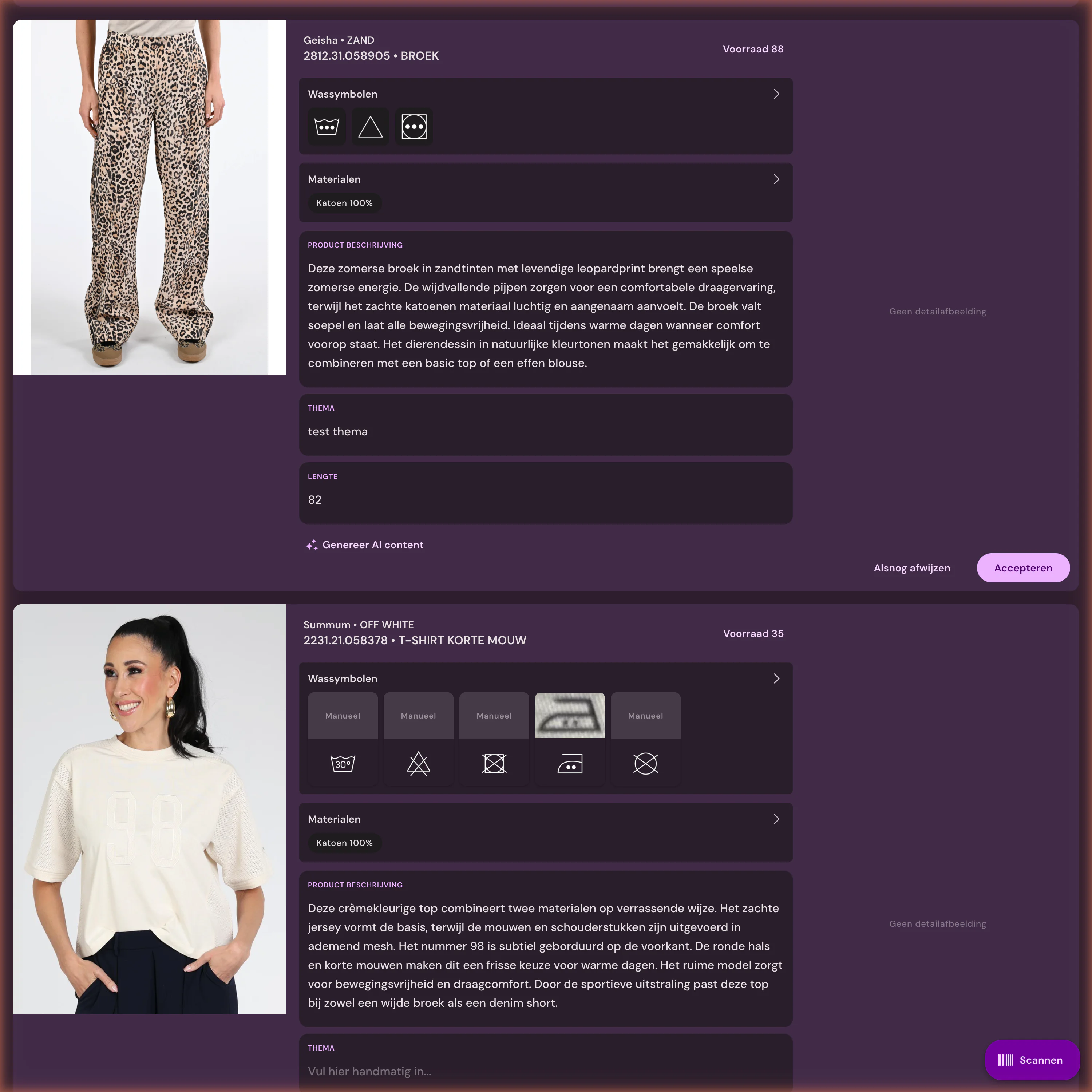
The Item Info scanner in the iPhone app
In the Photopilot app for iPhone, first scan the product barcode. Then photograph the material label and the care label. Care symbols are recognized live in the viewfinder, with a percentage for each symbol showing how confident the recognition is.
After the photo, the server confirms the recognition. Any symbol the server does not confirm remains visible with a subtle uncertainty indicator, so you can check or adjust it with one tap. The data is added directly to the item you scanned.
That turns reading labels into something you do while unpacking a delivery, instead of a separate desk job.
- 1. Scan the item's barcode
- 2. Photograph the material label: AI reads the composition
- 3. Photograph the care label: symbols are recognized in real time
- 4. Review uncertain matches and save them to the item
Other sources, and when scanning is not needed
Scanning is not always necessary. Many brands already provide material details and care instructions digitally via Fashion Cloud or in the product data from your ERP. Photopilot then copies that data automatically, so you only scan the products where nothing comes in.
If you sell only a few items, or mostly accessories without a care label, manual entry is fine. And if there is any doubt about a symbol, the physical label in the garment always takes precedence, not the webshop text.